
How people navigate your intranet has a story to tell – and we can reveal it

Have you stopped to consider the path your colleagues navigate to reach the intranet pages they’re searching for? Our latest product updates reveal the journey people take through your intranet - not just the page they eventually land on.
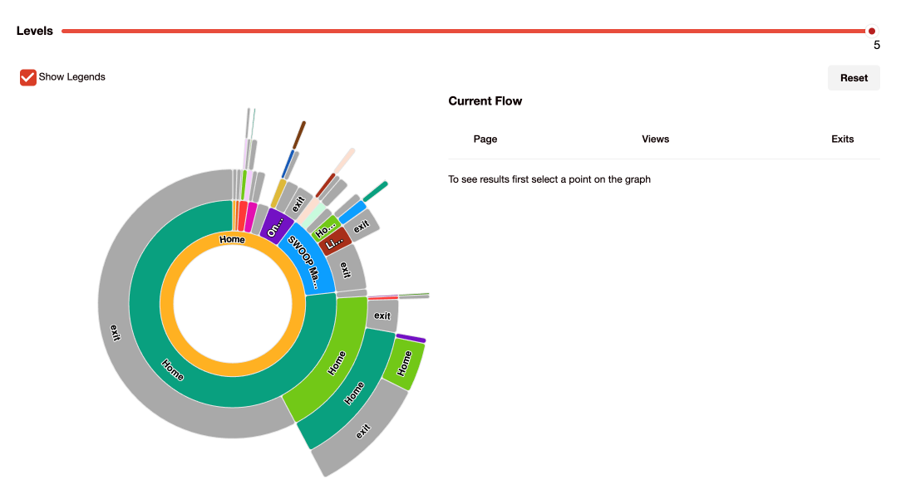
SWOOP Analytics’ Visitor Page Flow report.
This matters because most analytics tools only tell you what people read. SWOOP Analytics for SharePoint intranet now helps you understand how people move through your intranet, whether your content structure is working, where visitors drop off, and how to improve the paths to your most important content. It’s called the Visitor Page Flow report and, used in combination with our Click Activity report, we can show you how visitors are navigating through your intranet.
The Visitor Page Flow helps you visualise how people move through your intranet by showing which pages they visit immediately before and after a selected page. You can select which page to start from and how many steps you want to examine.
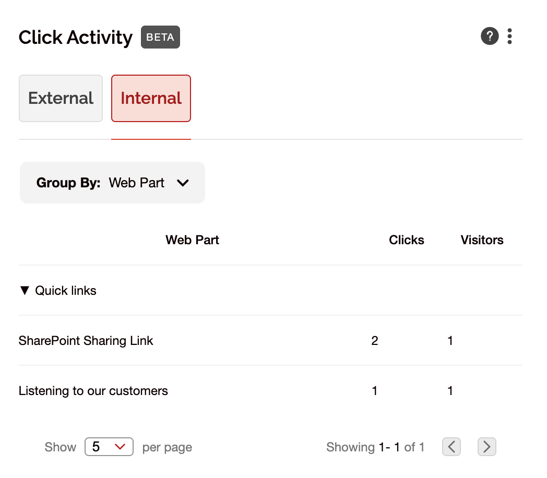
SWOOP Analytics’ Click Activity report.
Our new Click Activity report examines all the links on a page and breaks down how many times the links were clicked. You can select to look at links going to other intranet pages, or for those links that go to pages outside your intranet. You can see which webparts on the page the links are in, opening up the possibility to see if people are clicking links within page content, on buttons, in the search box or the navigation. This helps you understand whether people are taking the actions you intended, or simply navigating elsewhere.
Get your content AI-ready
If you’re rolling out Microsoft Copilot or other AI tools, you’re no doubt discovering that AI is only as good as the content it draws from. If your intranet is cluttered with outdated pages, orphaned content, and missing owners, AI will surface the wrong things.
We have been building governance and health metrics directly into SWOOP Analytics to help you get ahead of this problem:
Clutter Index - a score that reflects the level of noise and outdated content in your SharePoint intranet environment.
AI Readiness measures - assess whether your content is in good enough shape for AI deployment.
These reports are now available in SWOOP Analytics for SharePoint intranet, and we have expanded them to include the component parts of the scores (similar to our Health Score) to help pinpoint the main causes of a high or low score.
Bring analytics directly into SharePoint
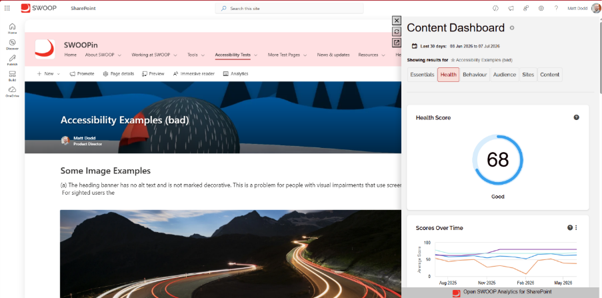
A screenshot of the SWOOP Analytics SharePoint extension within SharePoint.
Wouldn't it be great if you could access all your SWOOP Analytics reports from your page from within SharePoint itself? Now you can! Our SWOOP Analytics SharePoint extension is now in the SharePoint app store. Once installed, Page Editors who use SWOOP Analytics can see exactly what's happening on their pages and identify opportunities to improve performance, without leaving SharePoint.
We're also working on something we're very excited about: bringing SWOOP Analytics insights directly into AI assistants such as Microsoft Copilot. We're not quite ready to share all the details yet, but it represents an important step towards making analytics available wherever work happens. Watch this space.
ICYMI - other recent updates
We're always working to improve SWOOP Analytics. In case you've missed them, here is a quick rundown of the most recent updates:
Extra permissions options for advanced users such as dictionary access in SWOOP Analytics for SharePoint intranet.
SCIM data support making it easier to synchronise your HR directory data with SWOOP Analytics automatically.
Custom metadata in SWOOP Analytics for SharePoint intranet content reports allowing customers to add two extra fields to help filter and sort pages and news items.
Pagination improvements across SWOOP Analytics for Viva Engage.
Most Engaging Posts in SWOOP Analytics for Viva Engage now includes a separate Posts tab, making it easier to isolate posts created during a selected date range.
Show individual page visits in SWOOP Analytics for SharePoint intranet’s Activity By Time report meaning you can toggle between a total for all visits across selected pages or sites, or a breakdown of each.
From understanding how people navigate your intranet to improving content quality for AI, these updates are all designed to help you make better decisions with better data.
And we're not stopping there. Behind the scenes we're working on the next evolution of SWOOP Analytics - bringing together deeper insights, smarter experiences, and new ways to put analytics at the heart of everyday decision-making. We'll have more to share very soon.